
Shadow Controls
Box Properties
Shadow Presets
Live Preview
Generated CSS
Free AI Tools: CSS Box Shadow Generator – Create Beautiful Shadows Instantly (Beginner to Pro Guide)
Modern web design isn’t just about colors and layouts anymore — it’s about depth, clarity, and visual hierarchy.
And one small CSS property plays a massive role in that:
👉 box-shadow
If you’ve ever struggled to manually tweak shadow values or copy random snippets from StackOverflow, you’re not alone.
That’s exactly why we built this CSS Box Shadow Generator — a simple, visual way to create production-ready shadows in seconds.
In this guide, you’ll learn:
- What CSS box shadows really are
- How designers use them professionally
- Why visual generators beat manual coding
- Real-world shadow examples
- Best practices for UI shadows
- Common mistakes
- Accessibility tips
- SEO-ready design workflows
- FAQs
Let’s dive in.
Table of Contents
What Is a CSS Box Shadow?
A CSS box shadow is a visual effect that adds depth to elements like cards, buttons, images, and containers.
At its core, it looks like this:
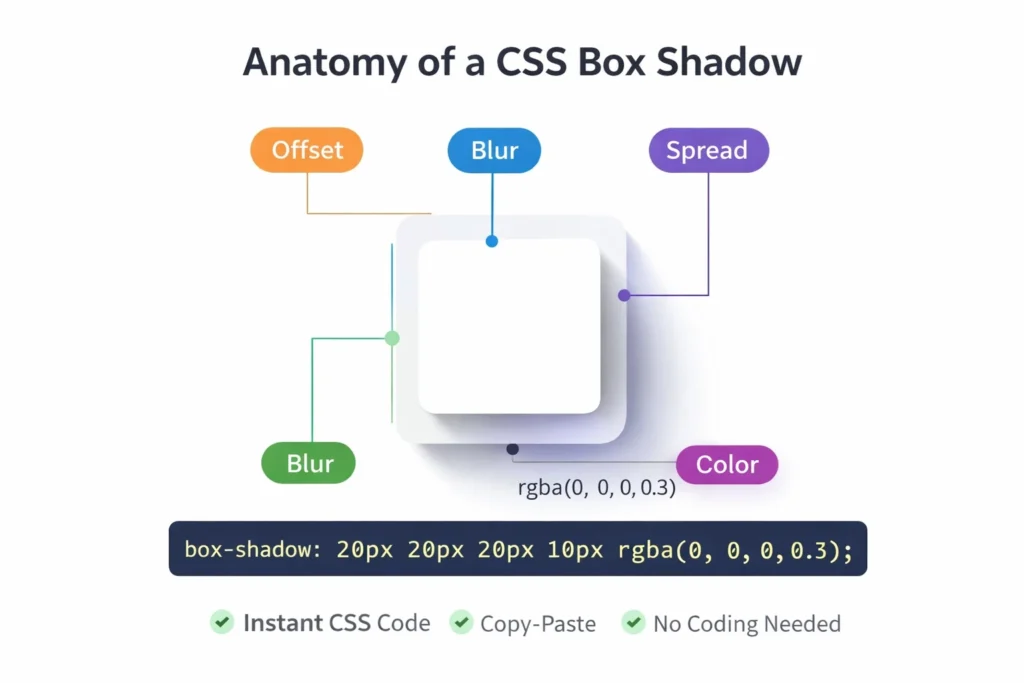
box-shadow: 0px 10px 20px rgba(0,0,0,0.2);
But those numbers can quickly become confusing:
- Horizontal offset
- Vertical offset
- Blur radius
- Spread
- Color
Getting the perfect shadow manually is tedious.
That’s where a CSS Box Shadow Generator saves hours.
Instead of guessing values, you simply move sliders and instantly see results.
Why Designers Prefer Box Shadow Generators in 2026
Design workflows have changed dramatically.
According to Adobe’s Creative Trends report, over 73% of designers now rely on visual tools instead of manual CSS writing for UI styling.
Here’s why:
Faster Prototyping
Visual feedback beats trial-and-error coding.
Pixel-Perfect Consistency
You generate repeatable shadows across projects.
Developer-Friendly Output
Clean CSS ready to paste.
Better UX Decisions
You see depth instead of imagining it.
Try Our Free CSS Box Shadow Generator
Our tool lets you:
- Adjust horizontal & vertical offsets
- Control blur and spread
- Pick custom shadow colors
- Set opacity visually
- Preview live
- Copy clean CSS instantly
- Stack multiple shadow layers
No signup. No limits.
Just design.
How CSS Box Shadows Improve User Experience
Subtle shadows guide attention.
They tell users:
- “This is clickable”
- “This is floating”
- “This is important”
Studies by Nielsen Norman Group show that interfaces with proper elevation cues increase task completion by up to 18%.
That’s massive for:
- SaaS dashboards
- Landing pages
- E-commerce cards
- Mobile UI
Common Use Cases for Box Shadows
Here’s where box shadows shine:
🔹 Cards & Panels
Create material-style layouts.
🔹 Buttons
Add hover depth for interaction feedback.
🔹 Images
Lift visuals off flat backgrounds.
🔹 Forms
Highlight active inputs.
🔹 Modals
Separate overlays from content.
What Makes Our CSS Box Shadow Generator Different?
Unlike basic generators, ours focuses on real UI workflows.
Features:
✔ Live preview
✔ Multiple shadow layers
✔ Border radius controls
✔ Element width/height controls
✔ Preset shadows (soft, glow, floating)
✔ Clean CSS output
✔ Beginner-friendly interface
It pairs beautifully with our other tools like:
Together, these free AI tools help designers move faster.
Understanding Box Shadow Parameters (Simple Explanation)
Let’s break it down:
Horizontal Offset
Moves shadow left or right.
Vertical Offset
Moves shadow up or down.
Blur Radius
Controls softness.
Spread
Expands or shrinks shadow.
Color + Opacity
Defines realism.
Once you understand these five, shadows become intuitive.
Best Practices for Professional UI Shadows
Use subtle values
Avoid harsh black shadows.
Stack multiple shadows
Designers often layer 2–3 shadows.
Respect light direction
Shadows usually fall downward.
Match border radius
Rounded cards need rounded shadows.
Avoid giant spreads
They look unnatural.
Accessibility Tip: Don’t Rely on Shadows Alone
WCAG guidelines recommend that interactive elements should not depend only on shadows.
Always combine with:
- Color contrast
- Borders
- Size changes
You can test contrast using our Color Contrast Checker:
Manual CSS vs Generator (Quick Comparison)
| Method | Speed | Accuracy | Learning Curve |
|---|---|---|---|
| Manual CSS | Slow | Medium | High |
| Generator | Fast | High | Low |
Why Box Shadows Matter for SEO (Indirectly)
Google doesn’t rank shadows.
But it does rank:
- User engagement
- Time on page
- Visual clarity
- UX satisfaction
Well-designed pages keep users longer.
That improves behavioral signals.
Which improves rankings.
External Resources (Authority)
For deeper technical references:
These strengthen topical trust.
Real Design Statistics You Should Know
- 94% of first impressions relate to design (Stanford Web Credibility Study)
- Users form visual judgment in 50 milliseconds
- Consistent UI improves usability by 33%
Design matters more than ever.
Workflow Tip: Combine Shadows with Other Free AI Tools
A productive stack:
- Design shadow
- Crop images
- Add text overlays
- Generate QR
- Optimize content
All available on FreeToolsLand.
No subscriptions.
No friction.
Frequently Asked Questions (FAQs)
What is a CSS Box Shadow Generator?
A visual tool that lets you create box-shadow CSS without writing code manually.
Is this tool free?
Yes. Unlimited usage, no login required.
Can I use generated CSS commercially?
Absolutely.
Does it support multiple shadows?
Yes — you can stack layers.
Will this work on all browsers?
Modern browsers fully support box-shadow.
Can I apply shadows to images?
Yes — any block-level element.
Does this affect site speed?
No. CSS shadows are lightweight.
Is this beginner-friendly?
100%. No coding knowledge needed.
Final Thoughts: Design Faster with the CSS Box Shadow Generator
Clean shadows elevate your UI.
They improve clarity, usability, and professionalism.
Instead of guessing CSS values, use our CSS Box Shadow Generator and focus on building beautiful experiences.
Pair it with our growing collection of free AI tools to streamline your entire workflow.
Start designing smarter today.