
Video creation has quietly crossed a turning point.
What once required professional editing skills, expensive software, and long hours on tools like Adobe Premiere Pro can now be done in a fraction of the time using modern AI video editor platforms. Whether you’re editing YouTube videos, creating short-form social content, building online courses, or preparing marketing clips, AI is no longer a “nice to have.” It’s becoming the default.
What makes this shift interesting isn’t just automation—it’s accessibility. A growing number of free video editor and free AI video editor tools are now capable of handling tasks that previously demanded technical expertise. Cutting clips, generating subtitles, cleaning audio, improving visuals, reframing videos for different platforms, and even creating videos directly from text are now standard features.
This guide explores 15 powerful AI video editor tools you can use in 2025. These tools are selected based on real-world usage, reliability, learning curve, and how effectively they help creators and businesses produce better videos faster.
Table of Contents
Why AI Video Editors Are Growing So Fast (With Real Data)
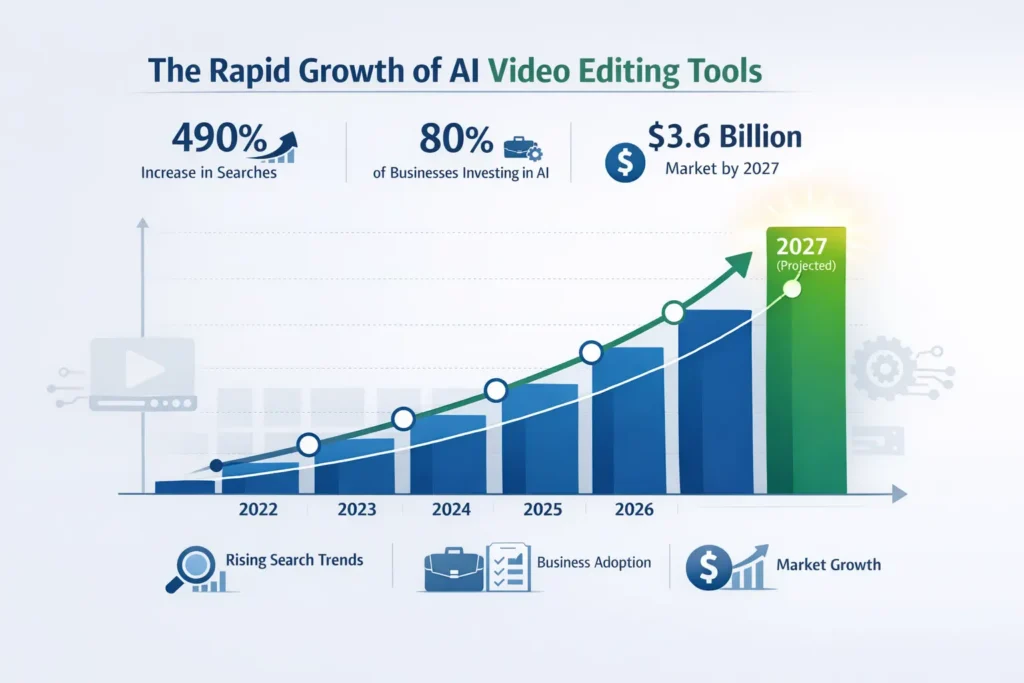
The rise of AI in video editing isn’t driven by hype—it’s backed by measurable adoption.
According to Wyzowl’s 2024 Video Marketing Report, 91% of businesses now use video as part of their marketing strategy, and more than 80% say they plan to increase investment in AI-powered editing tools this year.
Search behavior tells a similar story. Google Trends shows that searches for “AI video editor” have increased sharply over the past year, reflecting growing interest among both professionals and casual creators.
On the creator side, YouTube has reported that channels using AI-assisted workflows are able to publish significantly more content without compromising consistency. Meanwhile, Statista projects the global AI video market to reach $3.6 billion by 2027, growing at over 30% CAGR.
The takeaway is simple:
If you’re editing videos today, AI is no longer optional—it’s a competitive advantage.
Top 15 AI Video Editor Tools to Use in 2025
Below is a carefully curated list of AI video editor platforms that stand out for their practicality, features, and overall value.
1. FlexClip AI Video Magic (Featured Recommendation)
If you’re looking for an AI video editor that balances automation with creative control, FlexClip AI Video Magic is one of the most practical options available right now.
FlexClip focuses on removing friction from video creation. Instead of complex timelines and crowded panels, it uses AI to understand intent and handle repetitive tasks automatically.
What it can do:
- Generate videos from simple text prompts
- Create accurate automatic subtitles
- Remove backgrounds in one click
- Enhance lighting, color, and clarity
- Generate contextual B-roll scenes
- Clean audio and reduce noise
- Reframe videos for 9:16, 1:1, and 16:9 formats
This makes it especially useful for creators who want speed without sacrificing quality.
Who it’s best for:
- YouTubers and short-form creators
- Small businesses and marketers
- Educators and trainers
- Freelancers and agencies
For anyone searching for a free AI video editor that doesn’t feel limited, FlexClip is a strong starting point.
2. Adobe Premiere Pro (AI-Assisted Editing)
Adobe Premiere Pro remains the industry standard, but its AI capabilities—powered by Adobe Sensei—have changed how professionals work.
Key AI features include:
- Auto Reframe
- Speech-to-text subtitles
- Scene edit detection
- Automatic color matching
- Advanced noise reduction
While it’s not a free video editor, Premiere Pro is still unmatched for complex projects and professional pipelines.
3. CapCut AI Video Editor
CapCut has become extremely popular among TikTok and Instagram creators due to its simplicity and speed.
AI features include:
- Auto cut and smart trimming
- Template-based editing
- Automatic captions
- AI filters and effects
It’s a great choice for beginners who want results quickly without a steep learning curve.
4. Runway Gen-2
Runway pushes AI video editing into creative territory. It’s widely used for experimental filmmaking and visual storytelling.
Use cases include:
- Text-to-video generation
- AI-generated scenes
- Storyboarding
- Stylized motion visuals
Runway is ideal for creators who want to explore new visual styles.
5. Descript
Descript is especially popular among podcasters, educators, and content teams.
Its standout feature is text-based editing—you edit the transcript, and the video updates automatically.
Other features include:
- Filler-word removal
- Studio-quality audio cleanup
- Screen recording
- AI voice overdub
It’s excellent for long-form educational content.
6. Pika Labs
Pika Labs focuses on short, visually engaging AI videos.
It’s often used for:
- Music videos
- Trailer-style clips
- Animated social posts
The platform is growing quickly in creative communities.
7. Synthesia
Synthesia specializes in AI avatar-based videos.
It’s commonly used for:
- Training and onboarding
- Product explainers
- Internal communications
No camera or microphone is required, making it useful for corporate environments.
8. InVideo AI
InVideo AI is designed with marketers in mind.
Key capabilities:
- Script-to-video generation
- AI-recommended templates
- Automated B-roll and captions
- Multi-language support
It’s ideal for promotional and explainer content.
9. VEED.io
VEED offers a balanced mix of simplicity and creativity.
Features include:
- Automatic subtitles
- AI background removal
- Magic Cut
- Noise cleaning
- Eye-contact correction
It’s a reliable online video editor for everyday use.
10. Filmora AI Tools
Filmora has integrated several AI features without overwhelming users.
Highlights:
- AI smart cutout
- Motion tracking
- Auto beat sync
- Audio stretching
It’s popular among vloggers and YouTube creators.
11. Reface AI / Restyle AI
These tools focus on AI-driven face swapping and creative transformations.
They’re commonly used for:
- Entertainment content
- Creative storytelling
- Social media experiments
12. Lumen5
Lumen5 is designed for turning written content into videos.
It’s widely used for:
- Blog-to-video repurposing
- LinkedIn and corporate content
- Social media marketing
13. OpenShot (With AI Plugins)
OpenShot is a free, open-source video editor that supports AI plugins.
Capabilities include:
- Auto stabilization
- AI captioning
- Object tracking
It’s a good option for users who prefer open-source tools.
14. Animoto AI Enhancements
Animoto focuses on simplicity and speed.
It’s commonly used for:
- Slideshows
- Quick marketing videos
- Social media clips
15. Clipchamp (Microsoft AI)
Clipchamp integrates Microsoft’s AI capabilities.
Features include:
- Text-to-speech
- Audio cleanup
- Smart templates
- Subtitle generation
It’s especially useful for beginners and office users.
How AI Video Editors Improve Workflow
AI doesn’t replace creativity—it removes friction.
Here’s how these tools make editing faster and better:
1. Text-to-Video Creation
Platforms like FlexClip and InVideo AI turn scripts into complete videos.
2. Automatic Subtitles
Videos with captions see higher engagement and retention, especially on social platforms.
3. Smart B-roll
AI selects relevant visuals automatically.
4. Audio Cleanup
Noise, echo, and background hum are removed instantly.
5. Social Media Reframing
Videos are automatically resized for Shorts, Reels, and TikTok.
6. Visual Enhancement
Exposure, contrast, and color are adjusted automatically.
Helpful Free Tools for Creators
If you work with scripts, captions, or metadata, small utilities can save time. For example:
- A Word Counter helps refine scripts before recording
https://freetoolsland.com/word-count/ - Image tools help prepare thumbnails and visuals
https://freetoolsland.com/5-pro-image-edits/ - General free tools improve everyday workflows
https://freetoolsland.com/how-online-free-tools-can-help/
These small optimizations add up when producing content consistently.
Frequently Asked Questions
Which is the best free AI video editor?
FlexClip AI Video Magic, CapCut, VEED, and Clipchamp offer strong AI features with free plans.
Can AI edit videos automatically?
Yes. Many tools can cut footage, clean audio, generate captions, and even create videos from text.
Are AI video editors good for YouTube?
Absolutely. AI tools help creators publish more consistently with less effort.
Do AI tools replace Adobe Premiere Pro?
Not entirely. Premiere Pro is still essential for advanced workflows, but AI tools handle many repetitive tasks.
Can I create videos without recording anything?
Yes. Tools like Synthesia and FlexClip allow video creation using text, avatars, and templates.
Final Thoughts
AI is reshaping video editing in a very practical way. It’s not about replacing editors—it’s about removing friction so creators can focus on storytelling.
Whether you’re just starting out or managing high-volume content, today’s AI video editor and free AI video editor tools give you a real productivity advantage. If you want a balanced mix of accessibility, speed, and smart automation, FlexClip AI Video Magic is a strong place to begin.
The future of video creation isn’t coming—it’s already here.