
Reduce a photo or signature to an exact file size such as 20 KB, 50 KB or 100 KB, for online application forms, exam registrations and email limits. Pick a target, click Resize, and download a JPG that is as close to the limit as possible without going over. Everything happens in your browser.
How to resize an image to a specific KB
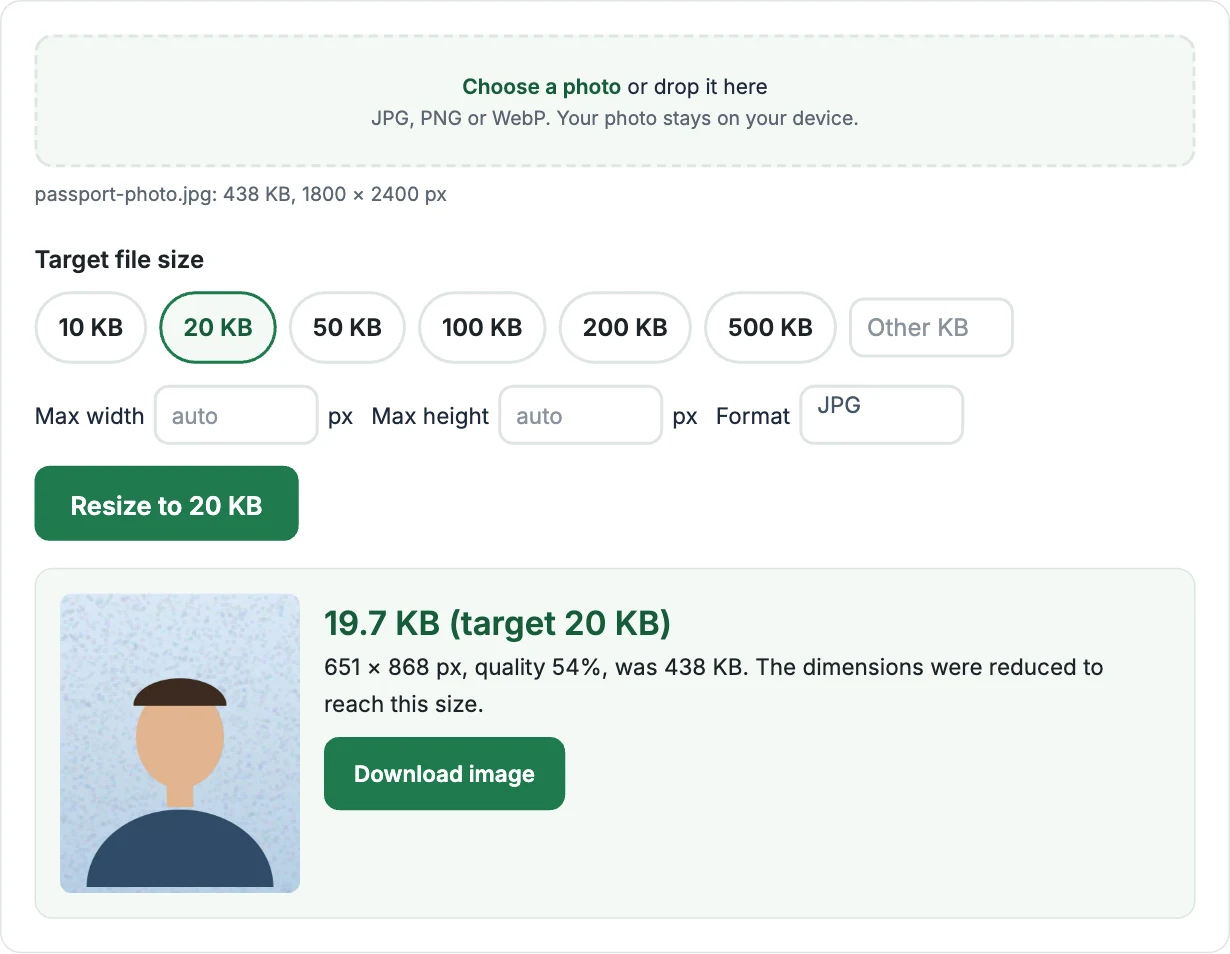
- Choose your photo (or drop it on the box). The tool shows its current size and dimensions.
- Pick the target size, such as 20 KB or 50 KB, or type your own. If the form also asks for dimensions (for example 200 × 230 pixels), enter them as max width and max height.
- Click Resize, check the preview and download. The file name ends with the target size, for example
photo-50kb.jpg.
How it gets to the exact size
The tool searches for the highest JPG quality that fits under your limit. To avoid a blocky, over-compressed picture it keeps the quality at 50% or more, and when that is still too big (a 12-megapixel phone photo squeezed to 50 KB, for example) it reduces the width and height instead, and tells you that it did. If you set a max width or height yourself, it keeps your dimensions and lowers the quality as far as needed. The result is never larger than your target.
Typical size limits on forms
| What | Common limit | Tip |
|---|---|---|
| Passport-size photo for exam and job forms | 20–50 KB, JPG | Crop to the face and shoulders first, on a plain light background. |
| Signature | 10–20 KB, JPG | Sign in black or blue ink on white paper and crop tightly around it. |
| Documents and certificates as images | 100–300 KB | Use 200 KB or more so small text stays readable. |
| Profile pictures and email attachments | Up to 500 KB | 500 KB keeps photos sharp on most screens. |
Tips for a sharp result at a small size
- Crop away everything you do not need with the Image Cropper before resizing; fewer pixels means better quality at the same KB.
- Enter the pixel size the form asks for. A 200 × 230 photo looks much better at 20 KB than a full phone photo squeezed to 20 KB.
- Photos with plain backgrounds compress far better than busy ones.
- Choose WebP only if the website accepts it; most government and exam portals want JPG.
Photo and signature sizes for UPSC, IBPS, NEET and SSC
| Exam | Photo | Signature | Note |
|---|---|---|---|
| UPSC (Civil Services and other exams) | 20–300 KB, JPG, 350 × 350 to 1000 × 1000 px | 20–300 KB, JPG, 350 × 350 to 1000 × 1000 px | Some notices also ask for your name and the date printed under the photo |
| IBPS (PO, Clerk, RRB) | 20–50 KB, 200 × 230 px | 10–20 KB, 140 × 60 px | Also a left thumb impression (20–100 KB) and a handwritten declaration (50–100 KB) |
| NEET UG (NTA) | 10–200 KB passport size; postcard-size photo also 10–200 KB | 10–50 KB | 2025 forms accepted JPG, JPEG or PDF |
| SSC (CGL, CHSL, MTS, GD) | Captured live with a webcam or phone camera during the application | 10–20 KB, JPG, about 6 × 2 cm | No photo file to resize; good light and a plain background matter more |
These limits are from the 2025 notices. Each recruitment can change them, so read the “photo and signature” section of the notice you are applying for before you upload, and aim for the middle of the range rather than the edge: a 25 KB photo is safer than a 20.1 KB one.
For a step-by-step guide with phone instructions, see how to resize a photo and signature for online forms.
Frequently asked questions
Why is my file slightly smaller than the target?
JPG sizes move in small jumps as quality changes, so the tool picks the largest file that stays at or under your limit. A 50 KB target usually gives a file between about 45 and 50 KB, which every “maximum 50 KB” form accepts.
My form says the photo must be between 20 KB and 50 KB. What should I pick?
Choose 50 KB. The result will be just under 50 KB and well above the 20 KB minimum.
Is my photo uploaded?
No. The photo is resized with your browser’s canvas on your own device and never sent to a server.
Can I upload an iPhone HEIC photo?
Most browsers cannot open HEIC files. On iPhone, share the photo to Files or email and choose “Most Compatible” or JPG, then open that file here.
Filling an exam or job form? Read our guide on how to resize a photo and signature for online forms (20 KB to 50 KB photo, 10 KB to 20 KB signature).
Looking for something else? Browse all our free image tools.
How do I change an image size to 50 KB?
Open the image above, type 50 in the target size box and download. The tool lowers the JPG quality step by step, and only shrinks the dimensions if quality alone cannot reach 50 KB.
Can I make a photo 200 DPI and under 50 KB?
DPI is a printing label and does not change the file size. What forms actually check is the pixel size and the KB size, so resize to the pixel dimensions the notice gives and then bring the file under the KB limit here.
Sources
Checked in November 2026:
- UPSC online application portal
- IBPS official website
- NTA NEET (UG) official website
- Staff Selection Commission official website
- BYJU’S: UPSC photograph and signature requirements
- Adda247: IBPS photo, signature, thumb and declaration sizes
- Careers360: NEET 2025 photo and signature requirements
- Careers360: SSC website captures a live photo in the application
How to cite this tool
Using this tool for coursework, a report or research? You can cite it like this (APA 7th edition):
Kumar, M. (2026). Resize Image to KB [Online tool]. FreeToolsLand. https://freetoolsland.com/resize-image-to-kb/
Related image tools
- Image Cropper: crop to a passport or square shape first.
- Image Converter: change PNG, WebP or JPG formats.
- Image Upscaler: make a small image larger.
- Remove EXIF and Location: strip GPS location from a photo before you upload it.