
Discord Timestamp Generator
Convert any date and time into Discord dynamic timestamps. Automatically adapts to every user’s local timezone and countdowns in real time.
How to Use the Discord Timestamp Generator in 3 Easy Steps
Creating dynamic timestamps that adapt to everyone’s local timezone inside Discord takes just a few clicks with our Discord timestamp maker:
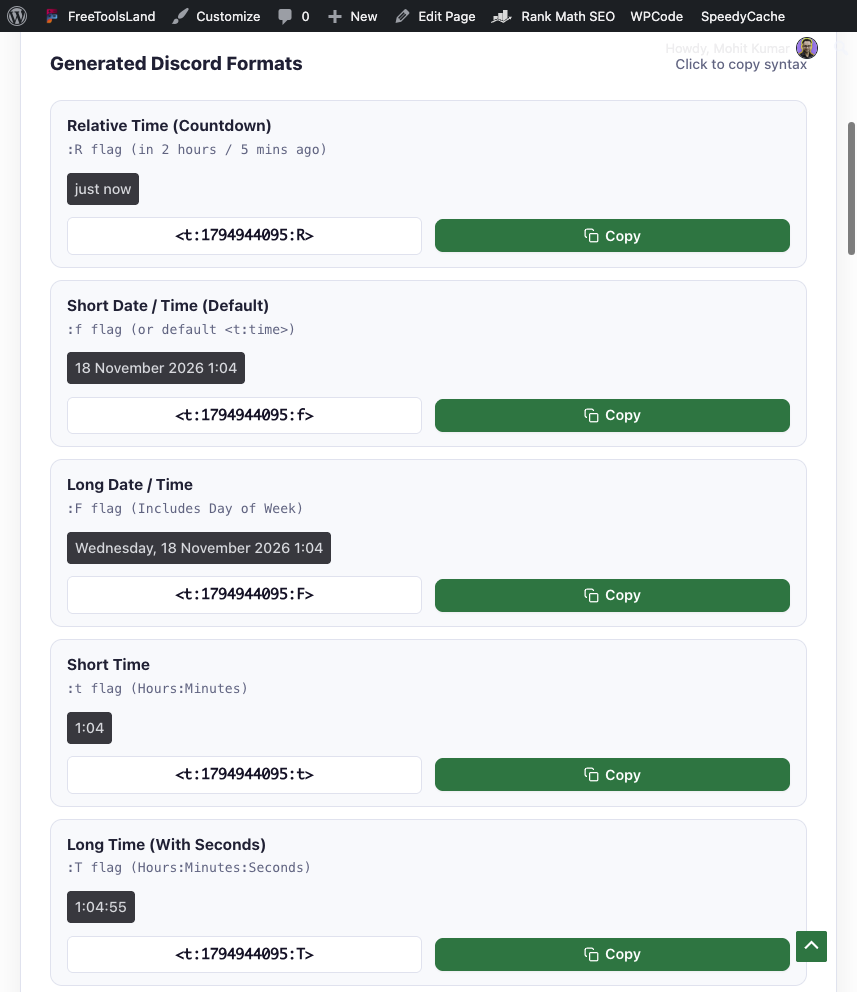
- Pick Date & Time (or Quick Offset): Select the target event date, hour, minute, and timezone using the picker, or click Relative Offset to set an exact countdown (e.g., in 2 hours 30 minutes).
- Select Your Preferred Discord Time Format: Preview all 7 available Discord timestamp styles in real time—from a live countdown (
:R) to full date and time displays (:F). - Copy and Paste in Discord: Click the Copy button next to your desired format. Paste the generated code directly into any Discord server channel, direct message (DM), thread, or announcement.
Discord Timestamp Format Cheat Sheet
Discord supports seven distinct timestamp display flags built on Unix epoch time. When pasted into chat, Discord parses the syntax and dynamically renders the date and time matching each reader’s personal device timezone and 12-hour/24-hour clock settings.
| Format Name | Style Flag | Discord Syntax | Example Output in Chat | Ideal For |
|---|---|---|---|---|
| Relative Time (Countdown) | :R |
<t:1794941000:R> |
in 2 hours / 3 days ago | Tournaments, raid countdowns, registration deadlines |
| Short Date / Time (Default) | :f (or omitted) |
<t:1794941000:f> |
November 18, 2026 8:00 PM | General announcements, meeting schedules |
| Long Date / Time with Day | :F |
<t:1794941000:F> |
Wednesday, November 18, 2026 8:00 PM | Major server launches, community AMAs, official events |
| Short Time | :t |
<t:1794941000:t> |
8:00 PM | Quick same-day reminders, session start times |
| Long Time (with Seconds) | :T |
<t:1794941000:T> |
8:00:00 PM | Precision countdown drops, live stream kickoffs |
| Short Date | :d |
<t:1794941000:d> |
11/18/2026 | Compact calendar lists, release schedules |
| Long Date | :D |
<t:1794941000:D> |
November 18, 2026 | Annual anniversaries, birthdays, milestone celebrations |
What Are Dynamic Discord Timestamps and How Do They Work?
A Discord timestamp generator creates specialized formatting tags that Discord’s client renders dynamically. Traditional plain text announcements—such as “Event starts at 8:00 PM EST”—force every international member to manually convert timezones, calculate daylight saving offsets, and risk missing important activities.
Discord solves this through standardized Unix Epoch timestamps. A Unix timestamp measures the number of seconds that have elapsed since January 1, 1970 (UTC). By wrapping this number inside Discord’s special tag <t:TIMESTAMP:STYLE>, the Discord desktop, web, and mobile apps inspect the user’s local operating system settings and automatically translate the time to their local clock.
Comparing Plain Text vs. Dynamic Discord Time Formats
| Criteria | Plain Text Time (“8:00 PM EST”) | Discord Dynamic Timestamp (<t:…:F>) |
|---|---|---|
| Timezone Accuracy | Ambiguous for international members; ignores Daylight Saving changes | 100% accurate; automatically converted on each member’s device |
| Countdown Capability | None; members must calculate how long is left | Live relative countdown (updates continuously: “in 45 minutes”, “in 2 hours”) |
| Hover Tooltip | None | Hovering over any timestamp shows the exact absolute date and time |
| Device Compatibility | Static text | Supported natively on Discord Web, Windows, macOS, Linux, iOS, and Android |
Top Use Cases for Discord Timestamp Maker
- Gaming Tournaments & Raids: Schedule cross-region raids in World of Warcraft, Destiny 2, or competitive matches in Valorant without confusion over UTC, EST, or BST.
- Community Announcements & AMAs: Post server maintenance windows, guest speaker interviews, or developer updates that display seamlessly for European, American, Asian, and Australian members alike.
- Discord Bot Development & Webhooks: Insert dynamic timestamps into bot embeds and automated notifications using Discord.js, Discord.py, or custom webhook payloads.
- Giveaways & Application Deadlines: Pair an absolute long date
<t:TIMESTAMP:F>with a relative countdown<t:TIMESTAMP:R>so entrants know both the exact schedule and how many hours remain.
Advanced Formatting: Combining Discord Timestamps with Markdown
You can combine your generated Discord timestamps with Discord’s built-in Markdown styling for maximum visual impact:
- Bold Timestamp:
**<t:1794941000:F>**makes the time prominent in announcement channels. - Header Embed:
### Raid Begins: <t:1794941000:t> (<t:1794941000:R>)formats the timestamp as a clear sub-header. - Blockquote List:
> Registration Closes: <t:1794941000:f>creates an indented callout card.
Frequently Asked Questions (FAQ)
What is a Discord timestamp generator?
A Discord timestamp generator is a free online tool that converts regular calendar dates and clock times into Discord’s specialized timestamp code (<t:UNIX:STYLE>). When pasted into Discord messages or bot embeds, the platform automatically renders the timestamp in every reader’s local timezone.
How do I create a countdown timer in Discord?
To create a live countdown in Discord, use the relative timestamp flag :R. In our tool, choose your future date and time, then copy the Relative Time code (e.g., <t:1794941000:R>). Discord will display a live timer showing “in 2 hours”, “in 15 minutes”, or “just now” that refreshes automatically.
Does Discord automatically convert timestamps for different time zones?
Yes. Discord timestamps are based on universal Unix Epoch seconds. Discord’s client reads the local device time and timezone of each individual user, displaying the converted local equivalent without needing any manual math.
Why is my Discord timestamp showing as plain text code?
If Discord shows literal text like <t:1794941000:f> instead of a styled badge, check for two common mistakes: (1) Ensure you didn’t wrap the tag in backticks (`<t:...>`), which turns it into a code block; and (2) Ensure the timestamp value contains only digits (Unix seconds) with no spaces or decimal points.
Can I use Discord timestamps on mobile (iOS & Android)?
Yes. Discord timestamps are fully supported across all official Discord platforms, including desktop clients (Windows, macOS, Linux), mobile apps (iPhone, iPad, Android), and Discord in web browsers.
Sources & Developer References
- Discord Developer Portal: Message Formatting & Timestamp Styles – Official Discord developer documentation on Unix epoch formatting and style flags.
- IEEE POSIX 1003.1 Standard – Definition of Coordinated Universal Time (UTC) and Seconds Since the Epoch.
How to Cite This Tool
If you reference this tool in community documentation, server guides, or academic research, please cite it using the APA 7th edition format:
Kumar, M. (2026). Discord Timestamp Generator & Time Format Maker [Online tool]. FreeToolsLand. https://freetoolsland.com/discord-timestamp-generator/
Discord Timestamp Generator – Dynamic Date & Time Formatter
Free Discord timestamp generator to create dynamic date and relative time formats (). Pick date, preview live chat formatting, and copy in 1 click.
Price Currency: USD
Operating System: Any (runs in a web browser)
Application Category: UtilitiesApplication