
Turn words into binary code, or decode a string of 0s and 1s back into readable text. Type or paste into the box and the translator works out which way to convert. It handles plain ASCII, accented letters and even emoji (UTF-8), and also shows the hex and decimal values of each byte.
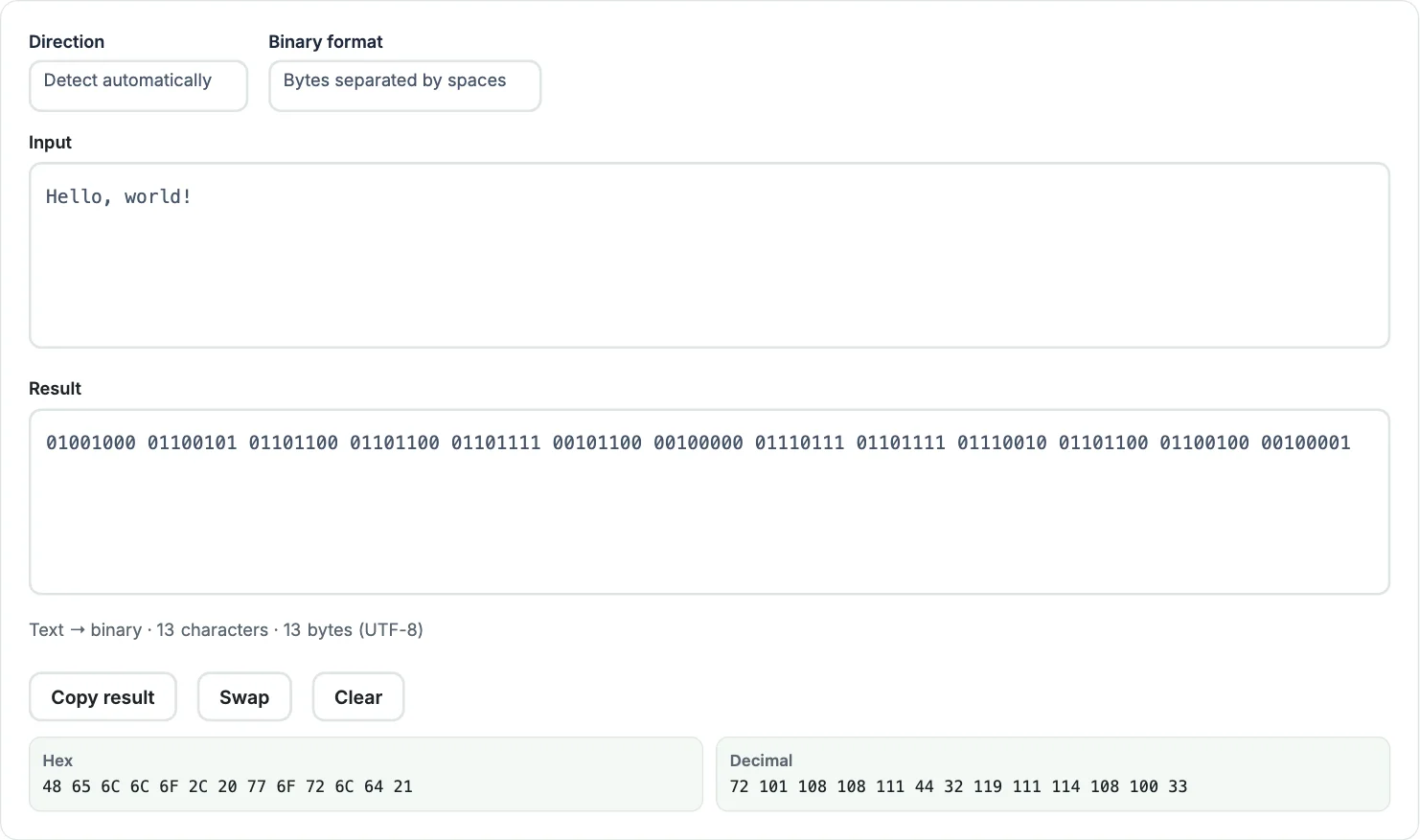
How to use the binary translator
- Type text, for example
Hi, to get its binary:01001000 01101001. - Or paste binary, with or without spaces, to read the text it encodes.
- Use Copy result to copy the answer, or Swap to turn the result back around.
How text becomes binary
Computers store each character as a number. In ASCII, capital A is 65, which is 01000001 in binary (64 + 1). Each group of 8 bits is one byte. Letters outside basic English, like é or emoji, take 2 to 4 bytes in UTF-8, so they turn into several groups of 8 bits.
Example
Hello → 72 101 108 108 111 → 01001000 01100101 01101100 01101100 01101111
Binary to text: reading it by hand
Split the binary into groups of 8, turn each group into a number by adding the place values (128, 64, 32, 16, 8, 4, 2, 1), then look the number up in the ASCII table. 01001000 = 64 + 8 = 72 = H.
Common characters in binary
| Character | Binary | Decimal | Hex |
|---|---|---|---|
| A | 01000001 | 65 | 41 |
| B | 01000010 | 66 | 42 |
| Z | 01011010 | 90 | 5A |
| a | 01100001 | 97 | 61 |
| z | 01111010 | 122 | 7A |
| 0 | 00110000 | 48 | 30 |
| 9 | 00111001 | 57 | 39 |
| Space | 00100000 | 32 | 20 |
| ! | 00100001 | 33 | 21 |
| ? | 00111111 | 63 | 3F |
Look up a byte: what does 01000111 mean?
Each group of 8 bits is one byte. Convert it to a decimal number, then look the number up in the ASCII table, which is the same as the first 128 characters of Unicode (Basic Latin chart).
| Binary | Decimal | Character |
|---|---|---|
| 01000111 | 71 | G |
| 01001001 | 73 | I |
| 01000001 | 65 | A |
| 01100001 | 97 | a |
| 00110010 | 50 | 2 |
| 00100000 | 32 | space |
So 01000111 is 64 + 4 + 2 + 1 = 71, which is the capital letter G. Capital letters run from 01000001 (A, 65) to 01011010 (Z, 90), and lowercase letters are the same plus 32, from 01100001 (a, 97) to 01111010 (z, 122). Digits 0–9 are 00110000 to 00111001.
A byte that starts with 11, such as 11000011, is not a character on its own: in UTF-8 it begins a two-, three- or four-byte sequence for letters like é or emoji. Paste the whole sequence into the translator to decode it.
Frequently asked questions
Why does my binary turn into strange symbols?
The bits are probably not in groups of 8, or a digit is missing. Each character needs exactly 8 bits (or a multiple of 8 for non-English characters).
Does it work with spaces between bytes?
Yes. Binary with spaces, without spaces or on several lines all work.
What is the difference between ASCII and UTF-8?
ASCII covers 128 characters: English letters, digits and punctuation. UTF-8 includes ASCII unchanged and adds every other language and emoji, using more bytes for those characters.
Can I convert binary to decimal or hex?
Yes. The Hex and Decimal boxes under the result show every byte in those formats.
What is 01000111 in text?
It is the capital letter G. 01000111 in binary is 71 in decimal, and 71 is G in ASCII and Unicode.
Sources
Checked in November 2026:
How to cite this tool
Using this tool for coursework, a report or research? You can cite it like this (APA 7th edition):
Kumar, M. (2026). Binary Translator [Online tool]. FreeToolsLand. https://freetoolsland.com/binary-translator/
Related tools
- Base64 Encoder and Decoder: encode text and files as Base64
- Case Converter: upper, lower, title and sentence case
- All text and developer tools