
Invisible Character Generator
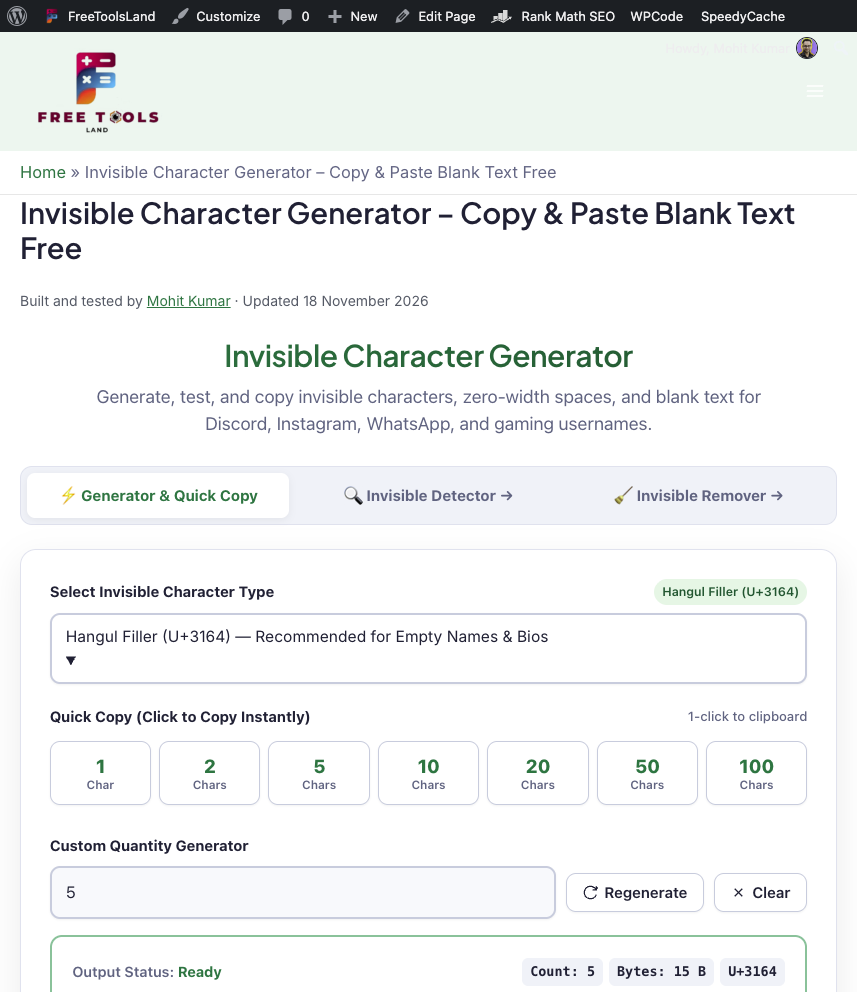
Generate, test, and copy invisible characters, zero-width spaces, and blank text for Discord, Instagram, WhatsApp, and gaming usernames.
Bonus Feature: Insert Invisible Characters Between Text
Hides zero-width spaces between every letter of your text. Keeps text readable to humans while preventing automated scraper detection, swear-filter flags, and hashtag auto-linking.
Copy Invisible Characters Instantly
An invisible character (also known as empty text, blank space, zero-width space, or hidden Unicode glyph) is a special character that exists in digital text encoding but renders with zero physical pixel visibility or as a transparent blank space. Unlike standard spacebar spaces (ASCII 32), which web forms and social media platforms frequently trim or reject as “empty input”, certain Unicode invisible characters bypass strict whitespace validators completely.
- Choose Your Character Type: For invisible usernames, empty bios, and Discord empty messages, choose Hangul Filler (U+3164) or Braille Pattern Blank (U+2800). For zero-pixel line wrapping and hidden metadata, select Zero Width Space (U+200B).
- Click Quick Copy: Click on any pre-set quantity button (1, 2, 5, 10, 20, 50, or 100 characters) to immediately copy the invisible string to your clipboard.
- Paste Anywhere: Paste the copied blank text into WhatsApp chats, Instagram profile bios, Discord server names, Fortnite nicknames, or form inputs requiring non-empty values.
Generate Multiple Invisible Characters
Need hundreds or thousands of blank spaces for document alignment, indentations, or testing string boundaries? The custom blank space generator allows you to specify an exact character count between 1 and 10,000 characters.
Simply enter your desired count in the quantity box, select your Unicode variant, and click Copy Invisible Characters. Our client-side generator dynamically computes the exact byte payload and character length without transmitting your data across any server.
Blank Space Generator: Zero-Width vs. Visible Blank Characters
Not all invisible characters behave the same way. Understanding the technical distinction between zero-width formatting characters and visible-width blank space symbols is crucial when formatting text across different digital applications:
| Category | Unicode Code Point | Visual Width | Trimming Behavior | Primary Use Case |
|---|---|---|---|---|
| Hangul Filler | U+3164 |
Blank (Standard Letter Width) | Treated as Korean letter; rarely trimmed by form validators | Invisible Instagram names, empty WhatsApp messages, gaming tags |
| Braille Blank | U+2800 |
Blank (Braille Cell Width) | Treated as graphic symbol; bypasses empty message filters | Discord empty messages, invisible channel names, Reddit formatting |
| Zero Width Space (ZWSP) | U+200B |
0 Pixels (Completely Invisible) | Invisible boundary; allows line breaks without visible spacing | Hiding watermarks, escaping swear filters, URL wrapping |
| Zero Width Joiner (ZWJ) | U+200D |
0 Pixels (Invisible) | Glue character; combines emojis and complex scripts | Emoji combinations (e.g., family or profession sequences) |
| No-Break Space (NBSP) | U+00A0 |
Standard Space Width | Prevents automatic line wrap between consecutive words | Typography, web development, preserving deliberate spacing |
| Ideographic Space | U+3000 |
Full-Width (CJK Character Width) | Wide fixed blank space used in East Asian typography | Indenting Japanese/Chinese paragraphs, gaming alignment |
Types of Invisible Unicode Characters
The Unicode Standard defines over a dozen unique whitespace and invisible formatting control codes, each serving dedicated linguistic, typographic, or rendering purposes:
1. Zero-Width Control Characters
Zero Width Space (U+200B) provides an invisible point where a text-processing engine may break a line of text if necessary, without inserting a hyphen or space. Zero Width Non-Joiner (U+200C) and Zero Width Joiner (U+200D) are used in complex scripts (such as Arabic, Persian, Devanagari) to control cursive connections between adjacent letters, and in modern emoji sequences to blend multiple emojis into single composite glyphs.
2. Hangul Filler (U+3164) & Braille Blank (U+2800)
Originally allocated in Unicode to represent empty block positions in Korean Hangul and 6-dot Braille patterns, these two symbols are technically categorized as letters or graphic symbols rather than traditional whitespace. Because most input validation scripts only check for ASCII space (32) and tab characters, Hangul Filler (U+3164) is the most reliable character for creating blank nicknames and empty bios on modern social media platforms.
How to Use Invisible Text on Instagram, WhatsApp and Discord
How to Send an Empty Message on WhatsApp
WhatsApp disables the “Send” button if a message contains only regular spaces. To send a completely blank message:
- Select Hangul Filler (U+3164) or Braille Pattern Blank (U+2800) in the generator above.
- Click Copy 1 Character.
- Open WhatsApp, paste the invisible character into the chat input field, and tap the Send button.
How to Make a Blank Name or Bio on Instagram
Instagram automatically strips standard spaces from the Name and Bio fields upon saving. To create a blank aesthetic:
- In the generator, select Hangul Filler (U+3164) and click Copy 1 Character.
- Go to your Instagram profile, tap Edit Profile.
- Paste the character into your Name or Bio field and tap Done. Because Instagram treats Hangul Filler as an alphabetic character, your blank profile saves without error.
How to Create an Invisible Discord Username or Channel Name
To hide your username in Discord servers or create empty voice channel names, copy Braille Pattern Blank (U+2800) or Hangul Filler (U+3164) and paste it into your server nickname settings. Note: Some servers run verification bots that flag completely invisible display names to prevent impersonation, so check your server rules before applying.
Related Text & Formatting Tools
Explore our other free, privacy-first text and development utilities:
- Invisible Character Detector – Inspect, detect, and analyze hidden zero-width and Unicode formatting characters in any text.
- Invisible Character Remover – Instantly clean, strip, and sanitize zero-width spaces and hidden characters.
- Word Counter – Accurately analyze word, character, sentence, and paragraph counts with reading time estimates.
- Letter Case Converter – Convert text between UPPERCASE, lowercase, Title Case, camelCase, and PascalCase.
- Discord Timestamp Generator – Generate dynamic time formats and live countdown timers for Discord messages and events.
- Strong Password Generator – Generate cryptographically secure random passwords right in your browser.
Frequently Asked Questions (FAQ)
What is an invisible character?
An invisible character is a Unicode code point that represents non-printable whitespace, zero-width formatting, or empty glyphs. When rendered on screen, it appears completely blank or has zero width, while still registering as a valid character in digital text processing.
How do I copy an invisible character on mobile?
Using our tool, simply tap any of the Quick Copy buttons (e.g., 1, 2, or 5 characters) or tap Copy Invisible Characters. Our script triggers your mobile device’s native clipboard API and displays a green “Copied!” confirmation.
Why doesn’t a regular spacebar space work for blank names?
Standard spaces typed on a keyboard are encoded as ASCII 32. Web applications and mobile apps run automatic string trimming functions (like text.trim()) that strip out leading and trailing ASCII whitespace. Special Unicode characters like Hangul Filler (U+3164) and Braille Blank (U+2800) are classified as letters or symbols, allowing them to bypass whitespace trimming routines.
How to Cite This Tool
If you reference this tool in technical documentation, articles, or guides, please cite it using the APA 7th edition format:
Kumar, M. (2026). Invisible Character Generator – Copy & Paste Blank Text [Online tool]. FreeToolsLand. https://freetoolsland.com/invisible-character-generator/
Invisible Character Generator – Copy & Paste Blank Text Free
Free invisible character generator to copy blank text, empty characters & zero-width spaces with 1 click. Works for Discord, Fortnite, Instagram & names.
Price Currency: USD
Operating System: Any (runs in a web browser)
Application Category: UtilitiesApplication